Docker Swarm 集群
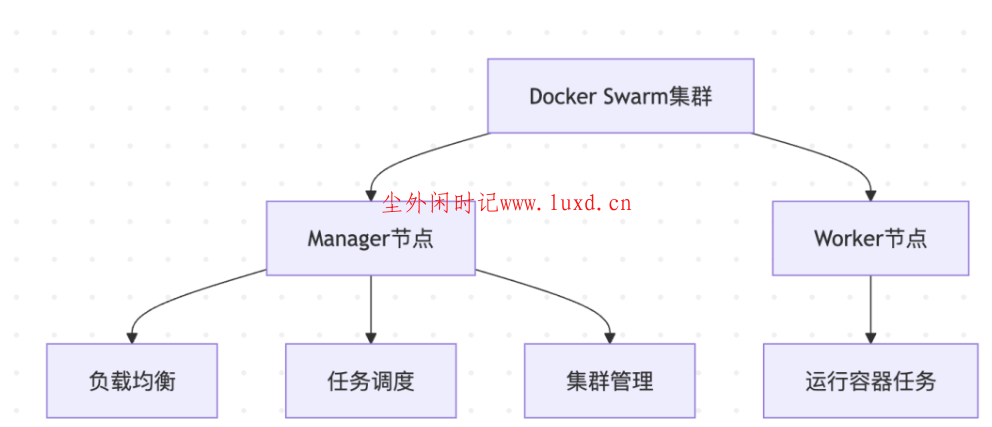
Swarm 初始化
# ========== 初始化集群 ==========
# 在第一个管理节点上初始化集群
docker swarm init --advertise-addr
# 查看加入集群的命令
docker swarm join-token worker
docker swarm join-token manager
# 在其他节点上加入集群
docker swarm join --token:2377
# ========== 节点管理 ==========
# 查看节点
docker node ls
# 查看节点详情
docker node inspect node1
# 更新节点可用性
docker node update --availability drain node1
# 提升节点为管理节点
docker node promote node1
# 降级节点为工作节点
docker node demote node1
# ========== 服务部署 ==========
# 部署服务
docker service create --name web --replicas 3 -p 80:80 nginx
# 查看服务
docker service ls
# 查看服务详情
docker service ps web
# 扩展服务
docker service scale web=5
# 更新服务
docker service update --image nginx:1.24 web
# 回滚服务
docker service rollback web
# 删除服务
docker service rm web
Swarm Stack
# docker-stack.yml
version: '3.8'
services:
web:
image: nginx:latest
ports:
- "80:80"
deploy:
replicas: 3
update_config:
parallelism: 1
delay: 10s
restart_policy:
condition: on-failure
delay: 5s
max_attempts: 3
resources:
limits:
cpus: '0.50'
memory: 512M
reservations:
cpus: '0.25'
memory: 256M
networks:
- webnet
visualizer:
image: dockersamples/visualizer:latest
ports:
- "8080:8080"
volumes:
- "/var/run/docker.sock:/var/run/docker.sock"
deploy:
placement:
constraints:
- node.role == manager
networks:
- webnet
networks:
webnet:
driver: overlay
# 部署 Stack
docker stack deploy -c docker-stack.yml myapp
# 查看 stacks
docker stack ls
# 查看服务
docker stack services myapp
# 删除 Stack
docker stack rm myapp
____________________________________
8.2 Docker 私有仓库
搭建私有仓库
version: '3.8'
services:
registry:
image: registry:2
container_name: docker-registry
ports:
- "5000:5000"
environment:
- REGISTRY_STORAGE_DELETE_ENABLED=true
volumes:
- registry_data:/var/lib/registry
- ./registry/config.yml:/etc/docker/registry/config.yml:ro
restart: unless-stopped
registry-ui:
image: joxit/docker-registry-ui:latest
container_name: registry-ui
ports:
- "8080:80"
environment:
- SINGLE_REGISTRY=true
- REGISTRY_TITLE=My Docker Registry
- DELETE_IMAGES=true
- SHOW_CONTENT_DIGEST=true
- NGINX_PROXY_PASS_URL=http://registry:5000
- SHOW_CATALOG_NB_TAGS=true
- CATALOG_MIN_BRANCHES=1
- CATALOG_MAX_BRANCHES=1
- TAGLIST_PAGE_SIZE=100
- REGISTRY_SECURED=false
- CATALOG_ELEMENTS_LIMIT=1000
depends_on:
- registry
restart: unless-stopped
volumes:
registry_data:
# 启动仓库
docker-compose up -d
# 推送镜像到私有仓库
docker tag myapp:latest localhost:5000/myapp:latest
docker push localhost:5000/myapp:latest
# 拉取镜像
docker pull localhost:5000/myapp:latest
# 删除镜像
DELETE /v2//manifests/
___________________
8.3 容器编排工具对比
特性 | Docker Compose | Docker Swarm | Kubernetes |
**复杂度** | 简单 | 中等 | 复杂 |
**适用规模** | 单机 | 中小集群 | 大规模集群 |
**学习曲线** | 低 | 中 | 高 |
**功能丰富度** | 基础 | 中等 | 强大 |
**生态系统** | 有限 | 有限 | 非常丰富 |
**企业支持** | 无 | 有 | 有 |
**适用场景** | 开发/测试 | 中小规模生产 | 大规模生产 |
_______________
附录:Docker 命令速查表
镜像命令
docker search <镜像名> # 搜索镜像
docker pull <镜像名> # 拉取镜像
docker images # 列出镜像
docker rmi <镜像ID> # 删除镜像
docker tag <镜像ID> <新标签> # 标记镜像
docker push <镜像名> # 推送镜像
docker build -t <标签> . # 构建镜像
docker history <镜像名> # 查看镜像历史
docker inspect <镜像名> # 查看镜像详情
docker save -o file.tar <镜像> # 导出镜像
docker load -i file.tar # 导入镜像
容器命令
docker run <镜像> # 运行容器
docker ps # 列出运行中的容器
docker ps -a # 列出所有容器
docker stop <容器ID> # 停止容器
docker start <容器ID> # 启动容器
docker restart <容器ID> # 重启容器
docker rm <容器ID> # 删除容器
docker exec -it <容器ID> bash # 进入容器
docker logs <容器ID> # 查看日志
docker inspect <容器ID> # 查看详情
docker stats <容器ID> # 查看资源使用
docker cp <文件> <容器>:<路径> # 复制文件到容器
docker commit <容器ID> <新镜像> # 容器提交为镜像
网络命令
docker network ls # 列出网络
docker network create <网络名> # 创建网络
docker network inspect <网络名> # 查看网络详情
docker network rm <网络名> # 删除网络
docker network connect <网络> <容器> # 连接容器到网络
docker network disconnect <网络> <容器> # 断开连接
卷命令
docker volume ls # 列出卷
docker volume create <卷名> # 创建卷
docker volume inspect <卷名> # 查看卷详情
docker volume rm <卷名> # 删除卷
docker volume prune # 删除未使用的卷
系统命令
docker info # 查看系统信息
docker version # 查看版本
docker system df # 查看磁盘使用
docker system prune # 清理未使用的资源
docker system prune -a --volumes # 完全清理