1. docker 命令集合
• Docker 是一个开源的容器化平台,用于打包、分发和运行应用程序。 • 它利用操作系统层的虚拟化技术,把应用和依赖打包进一个轻量级的“容器”中,实现跨平台下运行一致。 • 它简化了部署流程,解决了环境不一致问题,跨平台支持,支持微服务架构,提高了开发和运维效率。
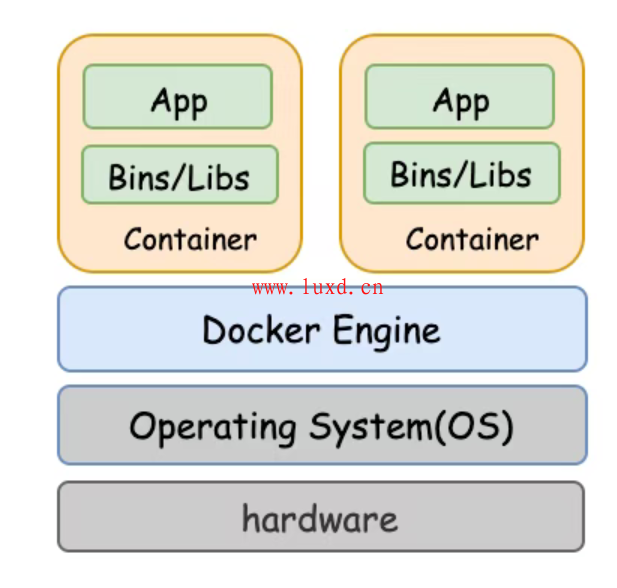
1.1 命令总览
Common Commands:
  run         Create and run a new container from an image
  exec        Execute a command in a running container
  ps          List containers
  build       Build an image from a Dockerfile
  pull        Download an image from a registry
  push        Upload an image to a registry
  images      List images
  login       Log in to a registry
  logout      Log out from a registry
  search      Search Docker Hub for images
  version     Show the Docker version information
  info        Display system-wide information

Management Commands:
  builder     Manage builds
  buildx*     Docker Buildx
  compose*    Docker Compose
  container   Manage containers
  context     Manage contexts
  image       Manage images
  manifest    Manage Docker image manifests and manifest lists
  network     Manage networks
  plugin      Manage plugins
  system      Manage Docker
  trust       Manage trust on Docker images
  volume      Manage volumes

Swarm Commands:
  swarm       Manage Swarm

Commands:
  attach      Attach local standard input, output, and error streams to a running container
  commit      Create a new image from a container's changes
  cp          Copy files/folders between a container and the local filesystem
  create      Create a new container
  diff        Inspect changes to files or directories on a container's filesystem
  events      Get real time events from the server
  export      Export a container's filesystem as a tar archive
  history     Show the history of an image
  import      Import the contents from a tarball to create a filesystem image
  inspect     Return low-level information on Docker objects
  kill        Kill one or more running containers
  load        Load an image from a tar archive or STDIN
  logs        Fetch the logs of a container
  pause       Pause all processes within one or more containers
  port        List port mappings or a specific mapping for the container
  rename      Rename a container
  restart     Restart one or more containers
  rm          Remove one or more containers
  rmi         Remove one or more images
  save        Save one or more images to a tar archive (streamed to STDOUT by default)
  start       Start one or more stopped containers
  stats       Display a live stream of container(s) resource usage statistics
  stop        Stop one or more running containers
  tag         Create a tag TARGET_IMAGE that refers to SOURCE_IMAGE
  top         Display the running processes of a container
  unpause     Unpause all processes within one or more containers
  update      Update configuration of one or more containers
  wait        Block until one or more containers stop, then print their exit codes

Global Options:
      --config string      Location of client config files (default "/root/.docker")
  -c, --context string     Name of the context to use to connect to the daemon (overrides
                           DOCKER_HOST env var and default context set with "docker context use")
  -D, --debug              Enable debug mode
  -H, --host list          Daemon socket to connect to
  -l, --log-level string   Set the logging level ("debug", "info", "warn", "error", "fatal")
                           (default "info")
      --tls                Use TLS; implied by --tlsverify
      --tlscacert string   Trust certs signed only by this CA (default "/root/.docker/ca.pem")
      --tlscert string     Path to TLS certificate file (default "/root/.docker/cert.pem")
      --tlskey string      Path to TLS key file (default "/root/.docker/key.pem")
      --tlsverify          Use TLS and verify the remote
  -v, --version            Print version information and quit
1.2 常用命令
docker pull <IMAGE ID>                   # 拉取镜像
docker images                            # 列出本地镜像
docker rmi <IMAGE ID>                    # 删除镜像
docker run -d -p 8080:80 <IMAGE ID>      # 后台运行容器并映射端口
docker ps                                # 查看运行容器
docker ps -a                             # 查看所有容器
docker stop <container_id>               # 停止容器
docker start <container_id>              # 启动容器
docker restart <container_id>            # 重启容器
docker rm <container_id>                 # 删除容器
docker exec -it <container_id> bash      # 进入容器
docker logs -f <container_id>            # 实时查看日志
1.3 docker run 常用参数
| 参数 | 说明 | |
-d | -d | |
-it | -it | |
--name | --name myapp | |
-p | -p 8080:80 | |
-e | -e ENV=prod | |
-v | -v /data:/app/data | |
--rm | --rm | |
--network | --network my-net | |
--restart | --restart=always | |
--entrypoint | --entrypoint /bin/bash | |
--cpus | --cpus="1.5" | |
--memory / -m | -m 512m |
2. Dockerfile 指令合集
• Dockerfile 是一个文本文件,包含了构建 Docker 镜像的指令。 • 通过 Dockerfile,可以定义镜像的基础环境、一来安装、环境变量配置及容器启动命令等。
官方文档:Dockerfile Reference[1]
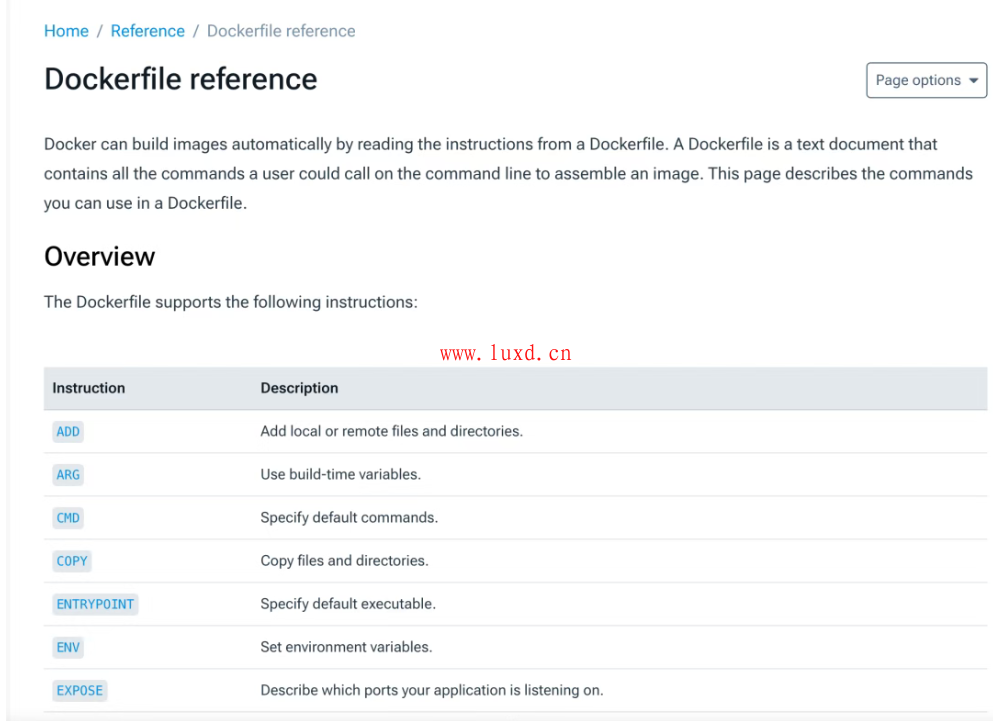
2.1 常用指令
FROM openjdk:17-jdk-slim                          # 基础镜像
WORKDIR /app                                      # 设置工作目录
COPY target/myapp-0.0.1-SNAPSHOT.jar app.jar      # 复制文件
COPY entrypoint.sh .                              # 复制文件
ENV SPRING_PROFILES_ACTIVE=prod                   # 设置环境变量
RUN chmod +x entrypoint.sh                        # 添加执行权限
EXPOSE 8080                                       # 暴露端口
ENTRYPOINT ["./entrypoint.sh"]                    # 设置容器入口点
3. docker compose
• docker comppse 用于定义和管理多容器应用。 • 它通过 YAML 格式的配置文件( docker-compose.yml),描述多个服务的镜像、网络、卷挂载和依赖关系。• 可通过 docker compose up -d一条命令启动多个相互依赖的容器。
官方文档:Compose Reference[2]
3.1 命令总览
Options:
      --all-resources              Include all resources, even those not used by services
      --ansi string                Control when to print ANSI control characters
                                   ("never"|"always"|"auto") (default "auto")
      --compatibility              Run compose in backward compatibility mode
      --dry-run                    Execute commandin dry run mode
      --env-file stringArray       Specify an alternate environment file
  -f, --file stringArray           Compose configuration files
      --parallel int               Control max parallelism, -1 for unlimited (default -1)
      --profile stringArray        Specify a profile to enable
      --progress string            Set type of progress output (auto, tty, plain, json,
                                   quiet) (default "auto")
      --project-directory string   Specify an alternate working directory
                                   (default: the path of the, first specified, Compose file)
  -p, --project-name string        Project name

Commands:
  attach      Attach local standard input, output, and error streams to a service's running container
  build       Build or rebuild services
  config      Parse, resolve and render compose file in canonical format
  cp          Copy files/folders between a service container and the local filesystem
  create      Creates containers for a service
  down        Stop and remove containers, networks
  events      Receive real time events from containers
  exec        Execute a command in a running container
  images      List images used by the created containers
  kill        Force stop service containers
  logs        View output from containers
  ls          List running compose projects
  pause       Pause services
  port        Print the public port for a port binding
  ps          List containers
  pull        Pull service images
  push        Push service images
  restart     Restart service containers
  rm          Removes stopped service containers
  run         Run a one-off command on a service
  scale       Scale services
  start       Start services
  stats       Display a live stream of container(s) resource usage statistics
  stop        Stop services
  top         Display the running processes
  unpause     Unpause services
  up          Create and start containers
  version     Show the Docker Compose version information
  wait        Block until the first service container stops
  watch       Watch build context for service and rebuild/refresh containers when files are updated
3.2 常用命令
docker compose up             # 启动所有服务
docker compose up -d          # 后台启动
docker compose down           # 停止并删除容器、网络
docker compose ps             # 查看服务状态
docker compose logs -f        # 查看日志
4. docker 服务管理
4.1 常用命令
nano /etc/docker/daemon.json      # 换源
systemctl daemon-reload           # 重新加载 systemd 配置文件
systemctl restart docker          # 重启 docker
4.2 坑点
• 使用命令 systemctl daemon-reload后可能导致原有容器和镜像‘消失’,并不是真的消失,可能是配置文件有问题或更改了目录,可以上网搜解决方案